Generate images and video in Codex
Yes. Add Makemancer to Codex with two commands and it can generate images with GPT Image 2, Nano Banana 2 or Seedream, video with Seedance, Kling or MiniMax, plus voiceovers, music and sound effects. The Codex CLI, IDE extension and app share one configuration. Images cost from 5 credits ($0.05), with no API key.
Set it up
Install the Codex plugin
The connector and every Makemancer skill in one plugin, so Codex follows the same workflows, such as a keyframe image before each video. Works in the Codex app and CLI.
- 1
Add the marketplace
Run this in your terminal:
codex plugin marketplace add makemancer/makemancer-marketplace - 2
Install the plugin
This installs the plugin with the connector and every skill:
codex plugin add makemancer@makemancer-marketplace - 3
Start a task and sign in
Open a new Codex task: the skills load in new tasks. Complete the browser sign-in when Makemancer asks.
Done. Start a task and try the prompt below.
Works with any Codex login. The IDE extension doesn't load plugins; there, add the MCP server and the skill by hand below. Official guide
Other ways to connect
Add the MCP server and the skill by hand
- 1
Add the server
Adds the tools:
codex mcp add makemancer --url https://makemancer.com/api/mcp - 2
Sign in
Codex opens the browser to sign in and remembers it:
codex mcp login makemancer - 3
Add the skill
Download the skill ZIP and unzip it into your Codex skills folder, then start a new task. Codex then follows Makemancer's workflows; type $ to pick the skill by name.
Download makemancer-skill.zipmkdir -p ~/.agents/skills && unzip -o ~/Downloads/makemancer-skill.zip -d ~/.agents/skills
First, ask for this
Use Makemancer to make a 3:4 minimalist jazz poster: large bold serif title "LATE SET" at the top, smaller text "Friday 9 PM · The Blue Room" at the bottom, a deep blue saxophone silhouette on warm cream. Use GPT Image 2, tell me the cost first, then save it to ./assets/late-set.png.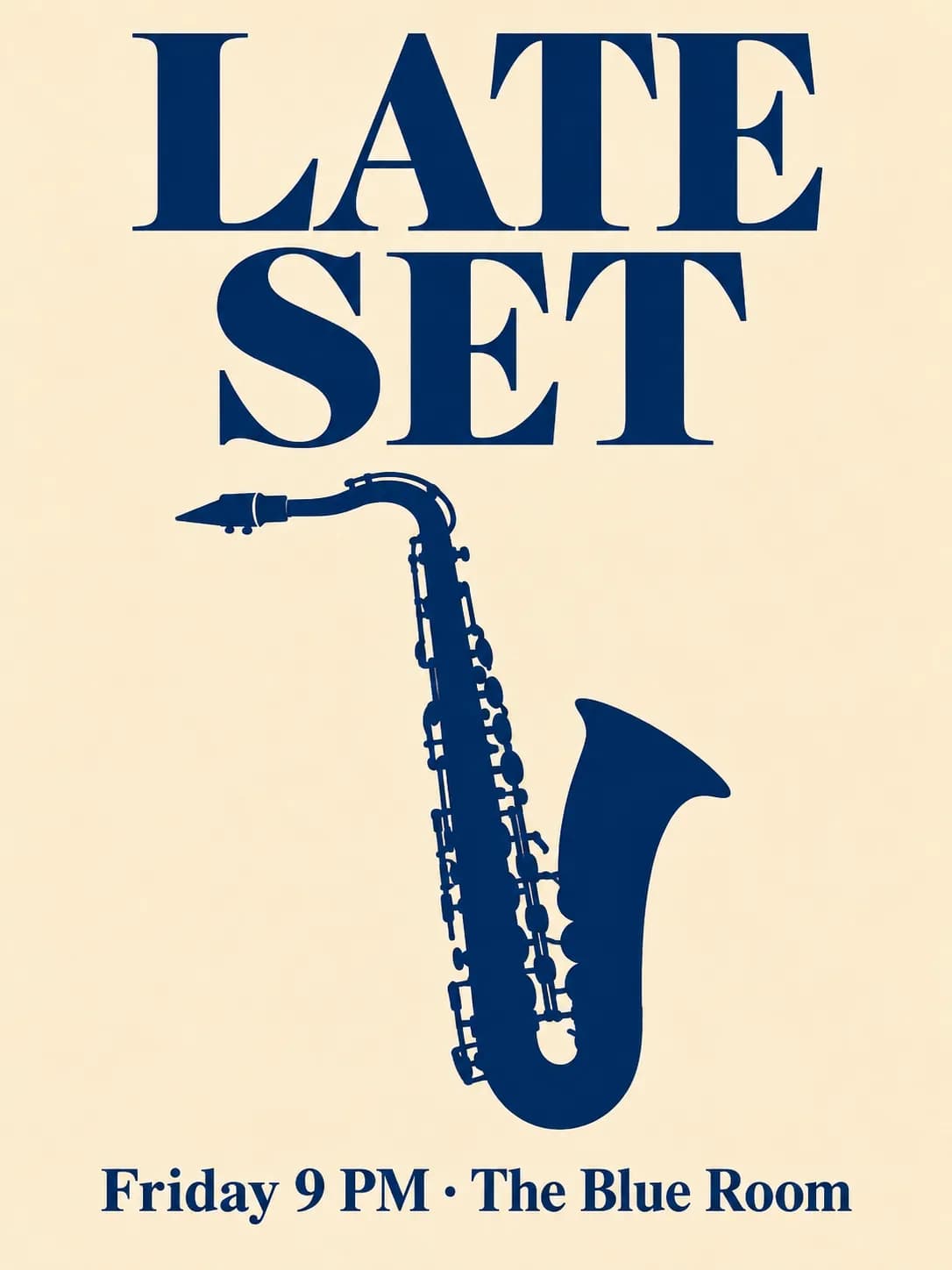
What you can do
- Posters and graphics with exact text
- GPT Image 2 keeps titles and short lines of text spelled as written, which suits posters, covers, social cards and placeholder art for a UI.
- Edit images from your workspace
- Point Codex to an image in the project. It uploads the file to Makemancer, has a model change it, and can download the new version back.
- Video clips
- Ask for a clip from a description or from an image: MiniMax H3, Seedance, Kling or Wan, most with native sound.
- Voice, music and sound for apps
- Narration for a product demo, a short jingle, or UI sounds and loops with ElevenLabs Sound Effects.
- One setup for CLI, IDE and app
- The Codex CLI, the IDE extension and the Codex app read the same ~/.codex/config.toml, so the server you add once appears in all three.
Limits to know
- Works with any Codex login
- No particular plan is needed for the server. Generations are paid with Makemancer credits from a one-time pack.
- Sign in once
- Run the login command after adding the server. Codex opens the browser to sign in and remembers it.
- Uploads and downloads use the network
- Uploading a local file or downloading a result runs a shell command that needs network access. Depending on your sandbox settings, Codex asks for approval first.
- No previews in the terminal
- The CLI shows links, not pictures or clips. Open them in a browser, or download the files into the project to look at them.
Why use it from Codex
Codex already knows your project. When it needs an image, a clip or a sound, it can write the model prompt from the code and copy around it, quote the cost, run the job and save the file where the code expects it. Name the model when it matters: GPT Image 2 for text on images, Nano Banana 2 for photographic scenes, MiniMax H3 or Seedance for video.
A good first run
Start with the poster prompt above. It costs one image, shows the cost quote, and checks that downloading into the project works in your sandbox. The same poster prompt on other models is in the image model comparison.
Questions
Can Codex generate images?
With Makemancer added, yes. Codex calls GPT Image 2, Nano Banana 2, Seedream or another image model and gets back a permanent link it can save into your repo.
How do I add an MCP server to Codex?
Run codex mcp add makemancer --url https://makemancer.com/api/mcp, then codex mcp login makemancer. You can also add the server to ~/.codex/config.toml by hand and run the login command.
Can Codex make videos?
Yes, through Makemancer. Ask for a clip and name a model such as MiniMax H3 or Seedance 2.0 Mini; a 5-second 480p Seedance 2.0 Mini clip costs 15 credits ($0.15).
Does it work in the Codex IDE extension and app?
Yes. They read the same configuration as the CLI, so there is nothing else to set up.
Do I need an OpenAI API key for GPT Image?
No. Makemancer runs GPT Image 2 and the other models. You pay with credits from a one-time pack, from $10, and failed jobs are refunded automatically.