Generate video, voice and music in ChatGPT
Yes. ChatGPT already makes images, and with Makemancer added as a custom MCP server it can also generate video with Seedance 2.0 Mini and 2.5, Kling, Wan and MiniMax, voiceovers with ElevenLabs, music, and images with Nano Banana or Seedream. A 5-second 480p Seedance 2.0 Mini clip costs 15 credits ($0.15), with no API key.
Set it up
Add Makemancer to ChatGPT
Add Makemancer as a custom MCP server from the Plugins page, then upload the Makemancer skill so ChatGPT follows the same workflows. ChatGPT uses its own server URL, shown below.
- 1
Open Plugins in ChatGPT
Open Plugins in ChatGPT, choose Add, then Add custom MCP server.
Open ChatGPT Plugins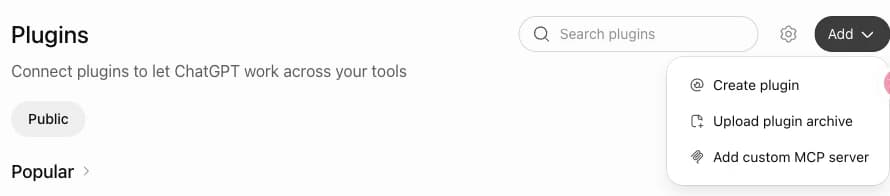
- 2
Paste the ChatGPT server URL
Name it Makemancer and paste the ChatGPT server URL. Keep Authentication on OAuth, tick “I understand and want to continue” and choose Create as a plugin.
https://makemancer.com/api/mcp/chatgpt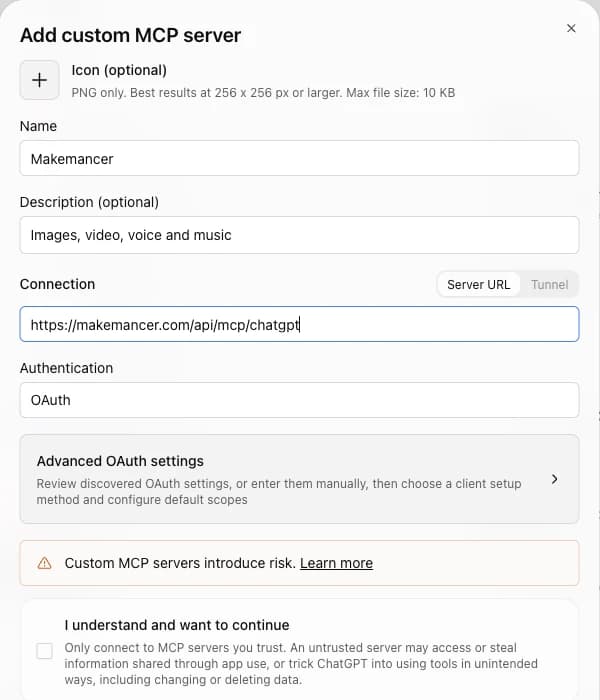
- 3
Sign in and pick it
Sign in with your Makemancer account. In a new chat, type @ and pick Makemancer.
- 4
Upload the Makemancer skill
Download the skill ZIP, then in ChatGPT go to Skills, choose Create, then Upload from your computer, and pick the ZIP. ChatGPT then follows Makemancer's workflows, such as making a keyframe image before it generates a video, and you can call it with @Makemancer. If you see Skills in ChatGPT, you can add it; some plans may not have it yet.
Download makemancer-skill.zip Done. Start a new chat, type @Makemancer and try the prompt below.
OpenAI lists custom MCP servers for Business and Enterprise/Edu workspaces on the web, where admins and owners create them. Availability on personal plans varies; if your Plugins page shows Add custom MCP server, it works. Official guide
First, ask for this
Use Makemancer to make a 4:5 photo of an amber perfume bottle on a block of travertine in low morning sun with Nano Banana 2, then turn it into a 5-second vertical video with a slow orbiting camera using Seedance 2.0 Mini at 480p. Tell me the total cost first.What you can do
- Video from text or a photo
- Describe a shot or attach a photo, and ChatGPT sends it to a video model: Seedance 2.0 Mini for low-cost drafts, Seedance 2.5 or Kling for longer cinematic clips, Wan or MiniMax for other looks. Most clips come back with sound.
- Animate images from the chat
- A file you attach, or an image ChatGPT made itself, is imported into your Makemancer library and can then be the first frame of a clip or the reference for an edit.
- Voiceovers, music and sound effects
- Paste a script for an ElevenLabs narration, ask for a jingle or a background track, or describe a sound effect for a video.
- More image models
- Name Nano Banana 2, GPT Image 2, Seedream, FLUX or Grok Imagine when you want a different look from ChatGPT's own images. Background removal and upscaling are there too.
- One library across chats
- Every result is saved to your Makemancer library with a permanent link, so a later chat, or another app you connect, can find and reuse it.
Limits to know
- Depends on your plan and workspace
- Custom MCP servers depend on your ChatGPT plan and, in a workspace, on admin settings. OpenAI's guide lists Business and Enterprise/Edu workspaces on the web; if your Plugins page shows Add custom MCP server, it works. The connection guide links the official article.
- Credits are bought on the website
- Add credits on the Makemancer pricing page with the account you signed in with. In the chat, ChatGPT can show your balance and quote a request before it runs.
- ChatGPT has its own server URL
- The URL for ChatGPT is different from the one for Claude and Codex. Use the one shown in the setup steps.
- Video and music take a few minutes
- If a clip is still processing, ask ChatGPT to check the job. It picks up the result without starting a new one.
What the connector adds to ChatGPT
ChatGPT generates images with OpenAI's own model. Makemancer adds tools for the rest: video models from ByteDance, Kuaishou, Alibaba, MiniMax and Google, ElevenLabs voices, music, sound effects and more image models. ChatGPT picks the tool, writes the model prompt, quotes the cost and shows the result in the conversation.
Using your own files
Attach a photo to the conversation, or point to an image ChatGPT just made, and ask to animate or edit it. ChatGPT imports the file into your library first, then passes its permanent link to the model. The original stays in your chat as it was.
Questions
Can I use Seedance in ChatGPT?
Yes. With Makemancer added, ask for a clip and name Seedance 2.0 Mini for drafts or Seedance 2.5 for premium shots. A 5-second 480p Seedance 2.0 Mini clip costs 15 credits ($0.15).
Can ChatGPT generate videos?
With Makemancer connected, yes: from a text prompt or from a photo in the chat. If you don't name a model, it uses Gemini Omni 1.1 Flash; name Seedance, Kling, Wan or MiniMax to pick another.
How do I add an MCP server in ChatGPT?
Open Plugins, choose Add, then Add custom MCP server. Paste the ChatGPT server URL, keep OAuth, create it as a plugin and sign in. In a new chat, type @ and pick Makemancer.
Can ChatGPT follow Makemancer's workflows?
Yes, with the Makemancer skill. Download the skill ZIP from the setup steps, then in ChatGPT go to Skills, choose Create, then Upload from your computer. ChatGPT then makes a keyframe image before a video and follows the other workflows. If you see Skills in ChatGPT, you can add it; some plans may not have it yet.
Why don't I see Add custom MCP server?
Custom MCP servers depend on your ChatGPT plan and, in a workspace, on your admin's settings. Check OpenAI's guide linked in the setup steps, or ask your workspace admin.
Do I need an OpenAI or ByteDance API key?
No. Makemancer runs the models and charges credits from a one-time pack, from $10. A job that fails is refunded automatically.