Setup
How to Add a Custom MCP Server to ChatGPT
Add a remote MCP server to ChatGPT from the Plugins page: the exact menu path, the OAuth and warning screens, which plans and workspaces have it, and how to call the tools in a chat.

You can add a custom MCP server to ChatGPT from the Plugins page. Choose Add, then Add custom MCP server, paste the server URL, keep authentication on OAuth, tick "I understand and want to continue" and choose Create as a plugin. After you sign in, type @ in a chat and pick the server to use its tools. Whether the option appears depends on your ChatGPT plan and workspace settings. This guide shows each screen with Makemancer, a server that adds video, voice, music and extra image models to ChatGPT.
What MCP adds to ChatGPT
The Model Context Protocol (MCP) is an open standard for connecting AI apps to outside tools. A remote MCP server publishes a list of tools; ChatGPT reads it, decides when a request needs one, fills in the inputs and shows the result in the chat.
ChatGPT already makes images with OpenAI's own image model. What it does not do in the chat is generate video clips with other models, voice a script with a stock voice, compose music or produce sound effects. Makemancer fills those gaps:
- Video: Seedance, Wan, Kling, MiniMax, Gemini Omni and more, from text or from a still.
- Voices: narration and dialogue with ElevenLabs and other speech models.
- Music and sound effects: songs, instrumentals, ambience and Foley.
- More image models: Nano Banana 2, Seedream and FLUX, plus upscaling and background removal.
Who can add a custom MCP server
OpenAI describes the requirements in its help article "Connecting custom MCP servers in ChatGPT". At the time of writing:
- Business, Enterprise and Edu workspaces can use custom MCP servers on the web. Admins and owners create them.
- Personal plans vary. Some accounts have the option behind a developer setting, and the names of menus have changed over time. Older guides call this "developer mode" or "connectors".
The quickest test is to open the Plugins page. If you see Add custom MCP server under Add, your account can do it. If you do not, read OpenAI's article for your plan or ask your workspace admin. We do not control which accounts have the feature.
Step by step
These steps match the connect page, with screenshots from ChatGPT.
Add Makemancer to ChatGPT
Add Makemancer as a custom MCP server from the Plugins page, then upload the Makemancer skill so ChatGPT follows the same workflows. ChatGPT uses its own server URL, shown below.
- 1
Open Plugins in ChatGPT
Open Plugins in ChatGPT, choose Add, then Add custom MCP server.
Open ChatGPT Plugins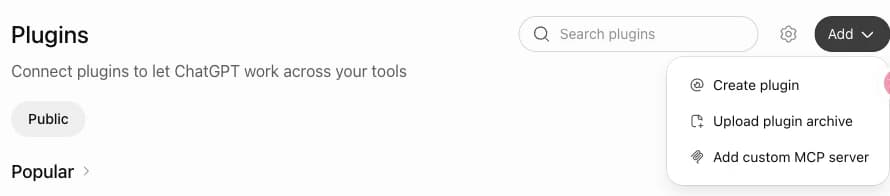
- 2
Paste the ChatGPT server URL
Name it Makemancer and paste the ChatGPT server URL. Keep Authentication on OAuth, tick “I understand and want to continue” and choose Create as a plugin.
https://makemancer.com/api/mcp/chatgpt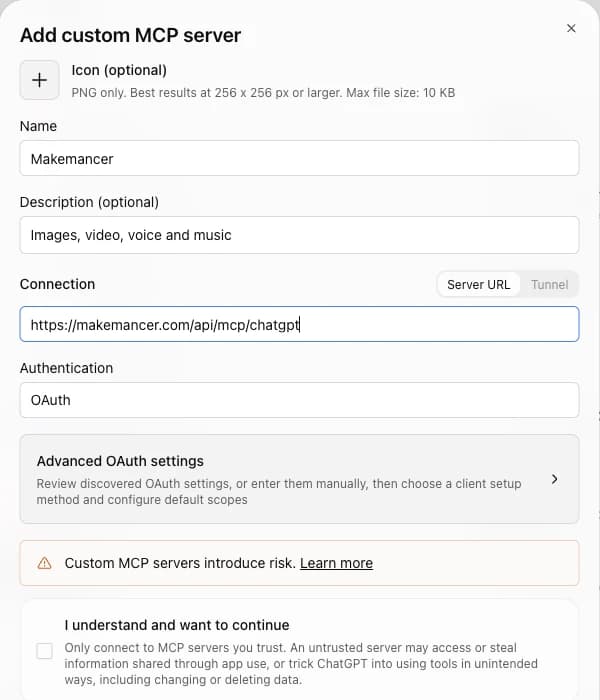
- 3
Sign in and pick it
Sign in with your Makemancer account. In a new chat, type @ and pick Makemancer.
- 4
Upload the Makemancer skill
Download the skill ZIP, then in ChatGPT go to Skills, choose Create, then Upload from your computer, and pick the ZIP. ChatGPT then follows Makemancer's workflows, such as making a keyframe image before it generates a video, and you can call it with @Makemancer. If you see Skills in ChatGPT, you can add it; some plans may not have it yet.
Download makemancer-skill.zip Done. Start a new chat, type @Makemancer and try the prompt below.
OpenAI lists custom MCP servers for Business and Enterprise/Edu workspaces on the web, where admins and owners create them. Availability on personal plans varies; if your Plugins page shows Add custom MCP server, it works. Official guide
Notes on each screen:
- Use the ChatGPT URL. ChatGPT has its own server address: https://makemancer.com/api/mcp/chatgpt. The general URL for Claude and Codex will not work here.
- Authentication stays on OAuth. You sign in with your Makemancer account in a new window. There is no API key or client secret to paste.
- The warning is standard. ChatGPT shows "I understand and want to continue" for every custom server, because OpenAI has not reviewed it. Tick it to go on.
- Create as a plugin. This saves the server so you can pick it in any chat.
Use it in a chat
Start a new chat, type @ and choose Makemancer. Then ask for what you need in plain words. Naming the model and resolution keeps the cost predictable:
Prompt to paste
Make a 4:5 photo of an amber perfume bottle on travertine in low morning sun. Then turn it into a 5-second vertical 9:16 slow orbit as the light shifts, using Seedance 2.0 Mini at 480p. Tell me the cost before each step.ChatGPT calls the image tool and shows the still. Nano Banana 2 returned this first frame:

It then asks before it starts the video. This is the clip made from that still:
ChatGPT may ask you to confirm a tool call before it runs, for example before a paid job starts. Read the summary it shows, then approve.
Uploading your own files
To animate or edit a photo you have, attach it to the chat as usual and ask Makemancer to use it. The server imports the file from the conversation and stores a permanent copy in your library, so later requests can reuse it. A direct image link works too.
Costs and credits
Makemancer charges per generation with credits; no subscription is required. Packs are one-time purchases on our website, from $10, and one credit is $0.01. Your ChatGPT plan does not include them.
| Generation | Cost | With 1,000 credits ($10) |
|---|---|---|
| Nano Banana 2 image (1K) | 12 | 83 |
| Seedance 2.0 Mini clip (480p, 5 s) | 15 | 66 |
| ElevenLabs v4, 1,000 characters | 20 | 50 |
| Music, two tracks | 16 | 62 |
Every request is quoted before it runs. If a job fails, the credits go back to your balance automatically. Unused credits can be refunded within 7 days of purchase. The full model list is on the pricing page.
Troubleshooting
Add custom MCP server is missing. Your plan or workspace does not allow it, or an admin has turned it off. Check OpenAI's article and your workspace settings.
The sign-in window does not finish. Allow pop-ups for chatgpt.com, then open the plugin again and sign in.
The plugin is added but ChatGPT does not use it. Type @ and select Makemancer at the start of the chat. ChatGPT only calls a plugin's tools when it is part of the conversation.
ChatGPT makes the image itself instead of using the server. That is ChatGPT's built-in image model. Say "use Makemancer with Nano Banana 2" to route the request to the server.
A job reports no balance. Buy a pack on the pricing page, then ask ChatGPT to run the request again.
Other apps
The same account works in Claude, Claude Code and Codex. If your ChatGPT workspace does not allow custom servers, Claude's custom connectors are available on the free plan, and Codex works with any login. All setups are on the connect page.
Questions
Can I add a custom MCP server to ChatGPT?
Yes, if your plan and workspace allow it. Open Plugins, choose Add, then Add custom MCP server. If that option is missing, check OpenAI's guide to connecting custom MCP servers or ask your workspace admin.
Do I need developer mode to use MCP in ChatGPT?
It depends on your account. Some accounts show Add custom MCP server only after an admin or the account settings allow it. OpenAI's help article lists the current requirements for each plan.
Why does ChatGPT need a different server URL?
Makemancer serves ChatGPT from its own endpoint, https://makemancer.com/api/mcp/chatgpt, with tools shaped for how ChatGPT calls them. Claude, Claude Code and Codex use the main URL.
Can ChatGPT make videos with this?
Yes. ChatGPT makes images on its own, and the Makemancer server adds video models such as Seedance and Wan, voices, music, sound effects and more image models. A 5-second Seedance 2.0 Mini clip at 480p costs 15 credits.
Where do I buy credits?
On the Makemancer website, from $10. Credits never expire, and failed jobs are refunded automatically.
Keep reading
 SetupHow to Add a Custom Connector in ClaudeAdd a remote MCP server to Claude as a custom connector: where the button is in Claude.ai and Claude Desktop, what each plan allows, how to switch the tools on in a chat, and how to fix common errors.November 5, 2026 · →
 ComparisonThe Best AI Video Model in Claude (and ChatGPT), by JobWhich video model to pick in Claude or ChatGPT for drafts, cinematic shots, product clips, long takes, talking avatars and motion transfer, with clips made from the same still.November 5, 2026 · →