How-to
How to Generate Videos in Claude Code
Claude Code can't render video by itself, but it can with an MCP server. Install the plugin, turn a still into a clip or write a video from text, and save the files into your project.
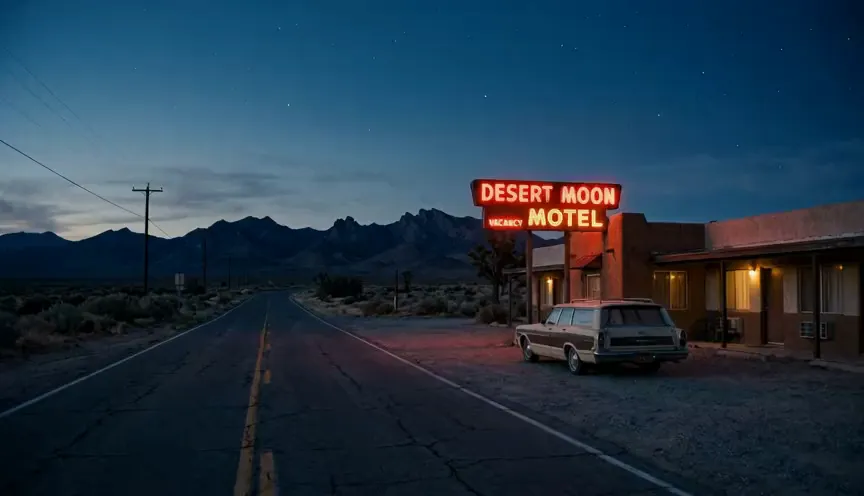
Claude Code does not generate video by itself. It is a coding agent, so it can write scripts and edit files but has no video model. Add a video MCP server and it can. With the Makemancer plugin installed, you ask Claude Code for a clip in plain English, it picks a model such as Seedance 2.0 Mini, Wan 3.0 or Gemini Omni 1.1 Flash, quotes the cost, and returns a file you can save straight into your project. A 5-second Seedance 2.0 Mini clip at 480p costs 15 credits. This guide covers the install, your first image-to-video and text-to-video requests, where the files go and which model to pick.
Can Claude Code make videos on its own?
No. Claude Code runs on Claude models, which read and write text and read images. Anthropic's Claude Code documentation describes MCP servers as the way to give it new tools, and that is what video generation needs. Without one, the best Claude Code can do is write code that renders motion graphics or call a video API that you set up and pay for yourself.
Makemancer is a remote MCP server with video, image, voice, music and sound effect tools. You sign in once, buy credits, and Claude Code uses the tools when your request calls for them. There are no API keys to store in your repository.
Plugin or MCP server?
You can connect in two ways:
- The plugin (recommended). It adds the MCP server and a set of skills: written workflows that tell Claude how to plan a video, prepare a first frame, pick a model and check the result. Requests like "make a 15-second product ad" go better with the skills loaded.
- The MCP server only. One command adds the tools without the skills. Choose this if you manage MCP servers yourself, or if you want the same configuration in several projects.
Both use the same account, library and credits. You can start with the server and install the plugin later.
Step 1: Connect Claude Code
Install the Claude Code plugin
The connector and every skill in one plugin. Works in the terminal, IDEs and the desktop Code tab.
- 1
Add the marketplace
Run this inside Claude Code:
/plugin marketplace add makemancer/makemancer-marketplace - 2
Install the plugin
Then install it:
/plugin install makemancer@makemancer-marketplace - 3
Sign in
Run /mcp, choose makemancer and sign in when the browser opens.
/mcp Done. Try the prompt below.
Works with any Claude Code login. Added the server by hand before? Remove it with claude mcp remove makemancer so it does not show twice. Official guide
Other ways to connect
Add the MCP server only
- 1
Add the server
No skills, just the tools. Run this in your terminal:
claude mcp add --transport http makemancer https://makemancer.com/api/mcp - 2
Sign in
Start Claude Code, run /mcp, choose makemancer and sign in.
After sign-in, run /mcp again. makemancer should be listed as connected. If it shows that it needs authentication, choose it and sign in again.
Step 2: Turn a still into a video
Image to video gives you the most control. You approve the first frame as a cheap still, then pay for motion only once the picture is right. Ask for both in one request:
Prompt to paste
Make a 16:9 photo of a desert motel at blue hour with a red neon sign. Show it to me first. Then turn it into a 5-second slow push-in with ambient sound using Seedance 2.0 Mini at 480p, and tell me the cost before you start the video.Claude makes the still with Nano Banana 2, shows it, and waits. Once you agree, it starts the video job. Video takes longer than an image, so Claude checks the job until it finishes and then shows the link. This is the clip from that request:
To use your own picture instead, give Claude the path: "Animate assets/hero.jpg as a slow orbit, 5 seconds, Seedance 2.0 Mini at 480p." Claude Code uploads the file from your project and uses it as the first frame. The image to video guide has more prompts for this.
Step 3: Write a video from text
For a quick idea with no still to start from, describe the shot directly. Say what moves, where the camera is and what you should hear.
Prompt to paste
Make a 5-second 16:9 video of a paper boat drifting down a rain-soaked gutter at night, neon signs reflected in the water, low camera at street level. Use Wan 3.0 at 480p and tell me the cost first.Wan 3.0 returned this. It opens after your first credit purchase; before that, ask for Seedance 2.0 Mini instead.
Text to video is faster to try but less predictable. When the framing matters, make a still first and animate it. See text to video for more examples.
Where the files go
Every result is saved to your Makemancer library with a permanent link. Claude shows that link in the terminal, and you can reuse it in later requests ("extend that clip", "add a voiceover to the last video").
To keep a copy in your repository, ask for it:
- "Download the video into
public/videos/motel.mp4." - "Save every clip from this session into
assets/clips/with descriptive file names."
Claude Code downloads the file with a shell command, so it asks for permission the first time like any other command. After that you can reference the file in your code, commit it, or hand it to a build step.
Which video model to use
If you do not name a model, Claude uses Gemini Omni 1.1 Flash. Name one in your request to switch.
| Model | Best for | Credits |
|---|---|---|
| Seedance 2.0 Minivideo/seedance-2.0-mini | Low-cost drafts and short clips with sound, 480p or 720p. | 15480p · 5 s |
| Wan 3.0video/wan-3.0 | Steady framing, long clips up to 30 s, and briefs from a document or webpage. | 33480p · 5 s |
| Gemini Omni 1.1 Flashvideo/gemini-omni-flash | The default: text, images or a source video in, native audio out. | 40720p · 4 s |
| Seedance 2.5video/seedance-2.5 | Cinematic hero shots, up to 30 s, with many image, video and audio references. | 93480p · 5 s |
| MiniMax H3video/minimax-h3 | Warm close-ups at 768p or 2K, with first and last frames. | 64768p · 4 s |
A fuller comparison, with clips from the same still on different models, is in the best AI video model for Claude and on the video model comparison.
What it costs
Video is priced per second, and higher resolutions cost more per second. Claude quotes every request before it runs. If a job fails, the credits go back to your balance automatically.
| Generation | Cost | With 1,000 credits ($10) |
|---|---|---|
| Seedance 2.0 Mini clip (480p, 5 s) | 15 | 66 |
| Seedance 2.5 clip (720p, 5 s) | 218 | 4 |
Credits come from one-time packs, from $10, and never expire. The pricing page lists every model, and AI video cost per second explains how to keep the bill down.
Tips for Claude Code
- Draft at 480p. Settle the shot at the lowest resolution, then ask for the final version at 720p or 1080p.
- Keep clips short. Five seconds is enough to judge motion. Join clips later instead of asking for one long take.
- Ask for a quote on batches. "How much would four 5-second variations cost?" Claude answers before spending anything.
- Put it in a script. Once a prompt works, ask Claude Code to write the request into a note or a README in your project, so the next clip matches.
Questions
Can Claude Code generate videos?
Not on its own. Claude Code writes and runs code but has no video model. With the Makemancer plugin or MCP server installed, it can call models such as Seedance, Wan, Kling and Gemini Omni and return the finished clip.
Does it need an API key?
No. You sign in with your Makemancer account once through /mcp. Generations are paid with credits, and a Seedance 2.0 Mini clip at 480p for 5 seconds costs 15 credits.
Where are the video files saved?
Every result is saved to your Makemancer library with a permanent link. Ask Claude to download it into your project folder, for example into public/videos, and it saves the file there.
Can I animate an image from my repository?
Yes. Point Claude to the file path. It uploads the image and uses it as the first frame of the clip.
Which plan of Claude Code do I need?
Any. The plugin and the MCP server work with every Claude Code login, and credits are bought separately from $10.
Keep reading
 ComparisonThe Best AI Video Model in Claude (and ChatGPT), by JobWhich video model to pick in Claude or ChatGPT for drafts, cinematic shots, product clips, long takes, talking avatars and motion transfer, with clips made from the same still.November 5, 2026 · →
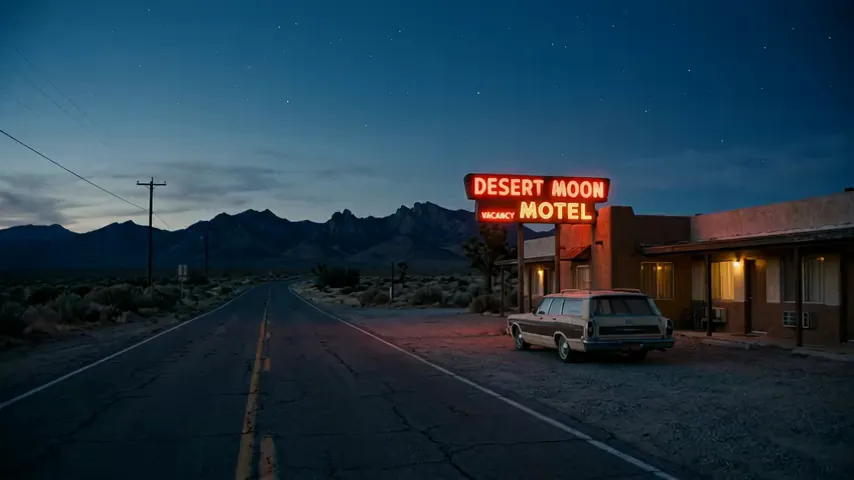 PricingAI Video Cost per Second: How Video Models Are PricedHow much an AI video costs per second on Seedance, Wan, Kling, MiniMax and Gemini Omni, why resolution changes the price, and how to keep the bill low with drafts and quotes.November 5, 2026 · →